
Docs
History & rollback
Every published change is recorded per field and language with red/green diffs - and one-click rollback into your draft.
AppBoard keeps a GitHub-style version history for your listing fields. Every published change is recorded so you can see what changed, when, and revert it in one click.
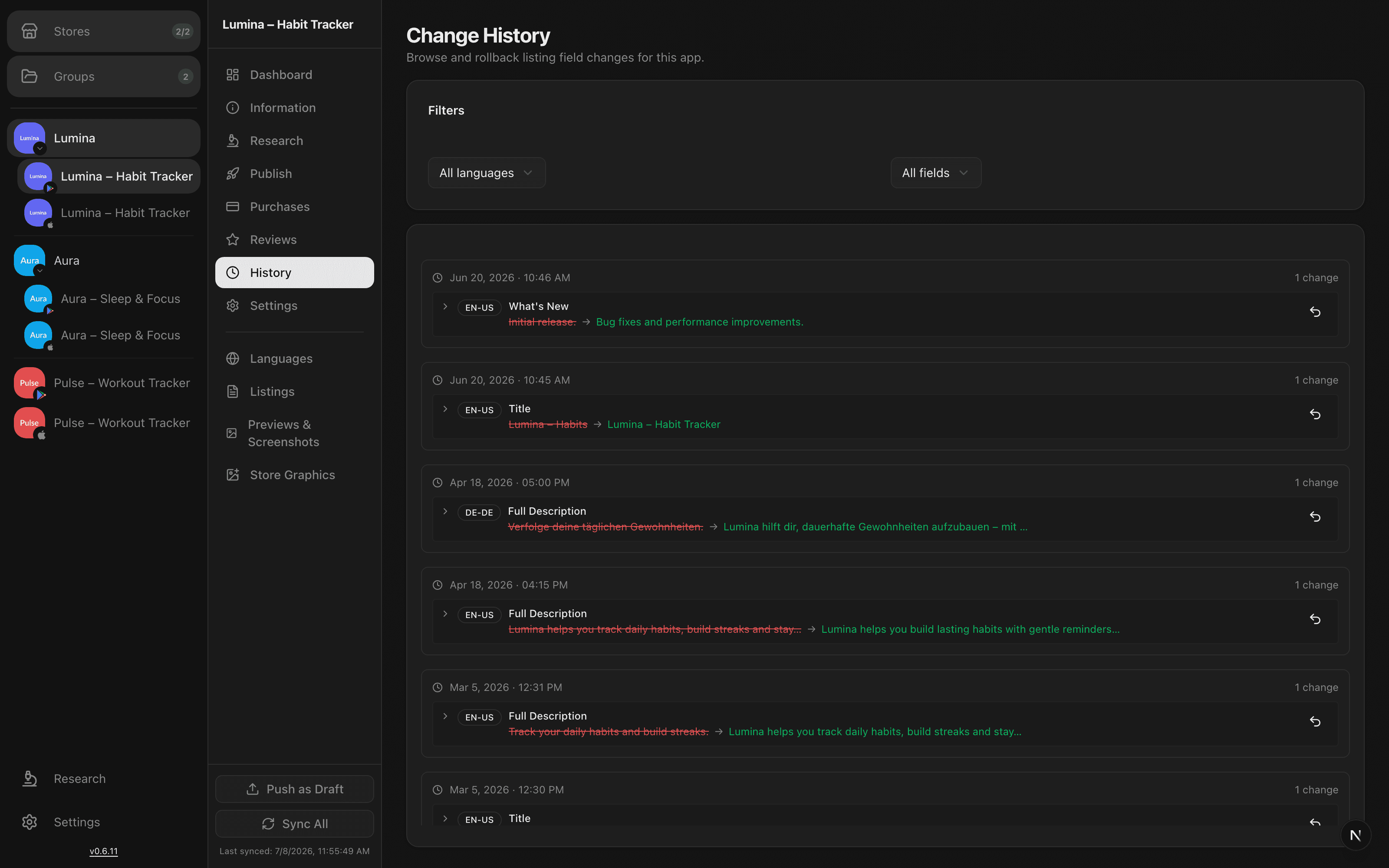
What gets recorded
Each time you publish, AppBoard stores the old and new value for every field that changed, tagged with its language. The history view lists these entries newest-first and lets you filter by language and by field, so finding a specific change in a busy multi-locale app stays quick.
Reading a diff
Every entry shows a red/green diff: the previous value in red, the new value in green. It reads like a code review, which makes it obvious whether a title tweak or a full-description rewrite is what actually shipped.
Rolling back
Found a change you want to undo? Roll it back with one click. Rollback doesn't touch the live store directly - it restores the old value into your draft and marks that language as dirty.
- Open the history entry you want to revert.
- Roll it back - the old value returns to your draft.
- Review the restored draft, then publish it to make the rollback live.
Heads up: rolling back updates your draft, not the store. The reverted value only goes live after you publish it, which keeps you in control of every write to the store.
Draft diffs
Alongside published history, AppBoard can show a live diff of your current draft versus what's on the store, per language - the same pending changes you'll see on the publish page before you push.