
Creative
App preview video vs screenshots: what actually converts
Every other surface went to video years ago. Store listings are the last place where good teams still ship five static frames, and the teams who do add video often break their own search result doing it.
What video is actually worth
Aggregated 2026 benchmarks from Meta ad accounts (agency round-ups, not Meta's own data, so directional):
| Metric | Static image | Video |
|---|---|---|
| CTR in the same Reels slot | 0.62% | 1.31% |
| Average CTR across placements | 0.90% | 1.14% |
| Time spent with the creative | 1.4 s | 4.7 s |
| Mid-funnel conversion rate | 1.6% | 2.1% |
Those numbers do not transfer. In a feed you are interrupting someone, and video wins because it stops a scroll. On a product page the user already tapped and is deciding whether to install, which is why store lifts land in single and low double digits, and why a bad video can lose you installs where a bad ad is merely ignored.
SplitMetrics reports about +16% from adding an App Store preview, StoreMaven puts it at +20% to +35%. A strong static set is worth a similar amount on its own, so video is additive to good screenshots, not a replacement. By category, AppFollow's directional ranges:
| Category | Conversion lift from video |
|---|---|
| Gaming | +8% to +18% |
| Health & Fitness | +7% to +14% |
| Fintech | +6% to +12% |
| Social | +5% to +11% |
| E-commerce | +4% to +10% |
| Utilities | +3% to +9% |
Several testing shops also report video hurting conversion in finance and productivity by 3 to 7 percent. The rule: video wins when your app is something to watch, and loses when it is something to use.
The two stores ship video differently
| Spec | App Store | Google Play |
|---|---|---|
| Videos per listing | Up to 3 per localization | 1 promo video per store listing |
| How you supply it | Uploaded file (M4V, MP4, MOV, up to 500 MB) | A YouTube URL for a single video, not a playlist or channel |
| Length | 15 to 30 s | No hard limit, 30 to 90 s recommended |
| In search results | Autoplays, muted | Does not appear at all |
| On the product page | Autoplays | May autoplay inline muted, up to 30 s, device dependent |
| Orientation | Portrait or landscape, and it changes the layout | Landscape 16:9 preferred |
| Per language | Yes, per localization | Yes, listing graphics are localized per language |
On the App Store video is a discovery asset that plays before anyone has chosen you. On Play it only exists after the tap. That one difference should decide the budget split, and it is the opposite of how most teams allocate.
Play: YouTube channels per language
Under Grow users, Store presence, YouTube Videos you can attach channels or playlists to the listing, with a language set on each, one language per channel. A listing in four languages can carry four video surfaces instead of one. Very few do. The rules:
- Public videos, though playlists can be unlisted.
- Monetization off, embeddable, owned by your app or game.
- No Shorts, no live videos.
- Games: uploaded within 90 days to show on the listing, 21 days for the Games tab, 180 days for the Apps tab.
- Needs Premium growth tools eligibility and the Manage store presence permission.
- One playlist for an app, several playlists or channels for a game.
Play Console then reports viewers, click-through and installs over 28 days. A live example: Buzzin: TV Party Game Show. Play also accepts a referrer parameter on store links, so tag them before sharing rather than guessing which channel drove an install.
The App Store landscape trap
Apple lets a preview be portrait or landscape and warns about neither consequence. On the product page a landscape preview does not lead the gallery, it moves into a separate A Closer Look section:
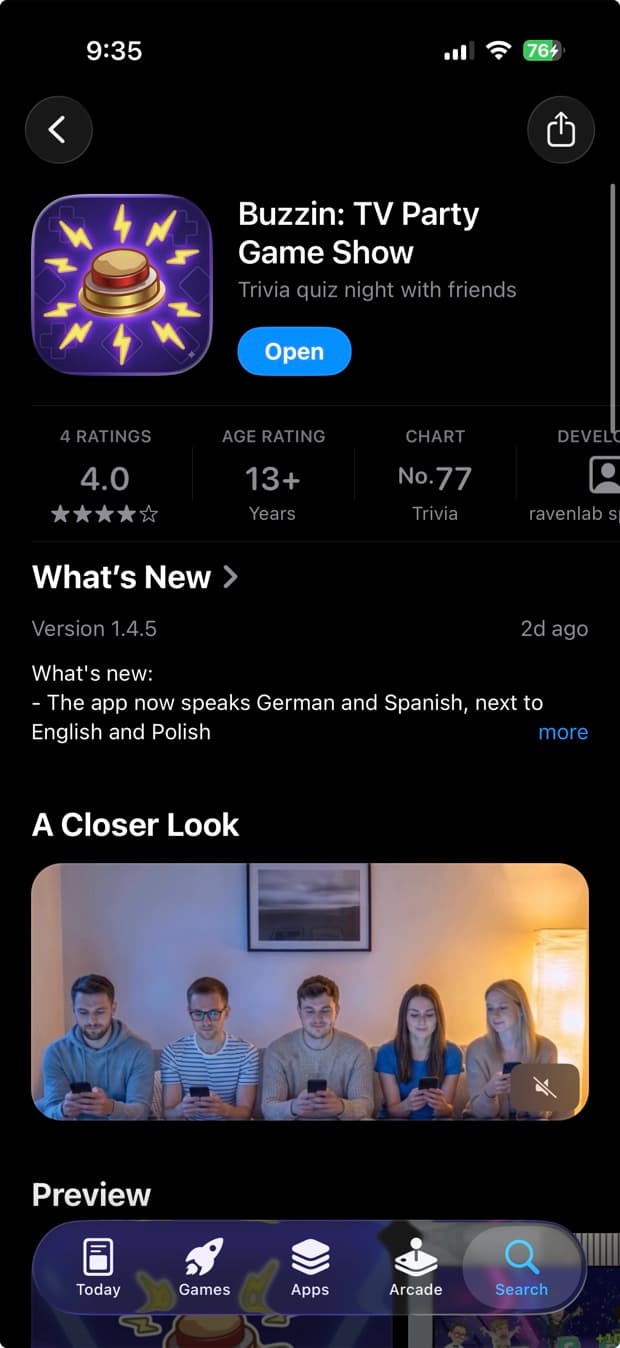
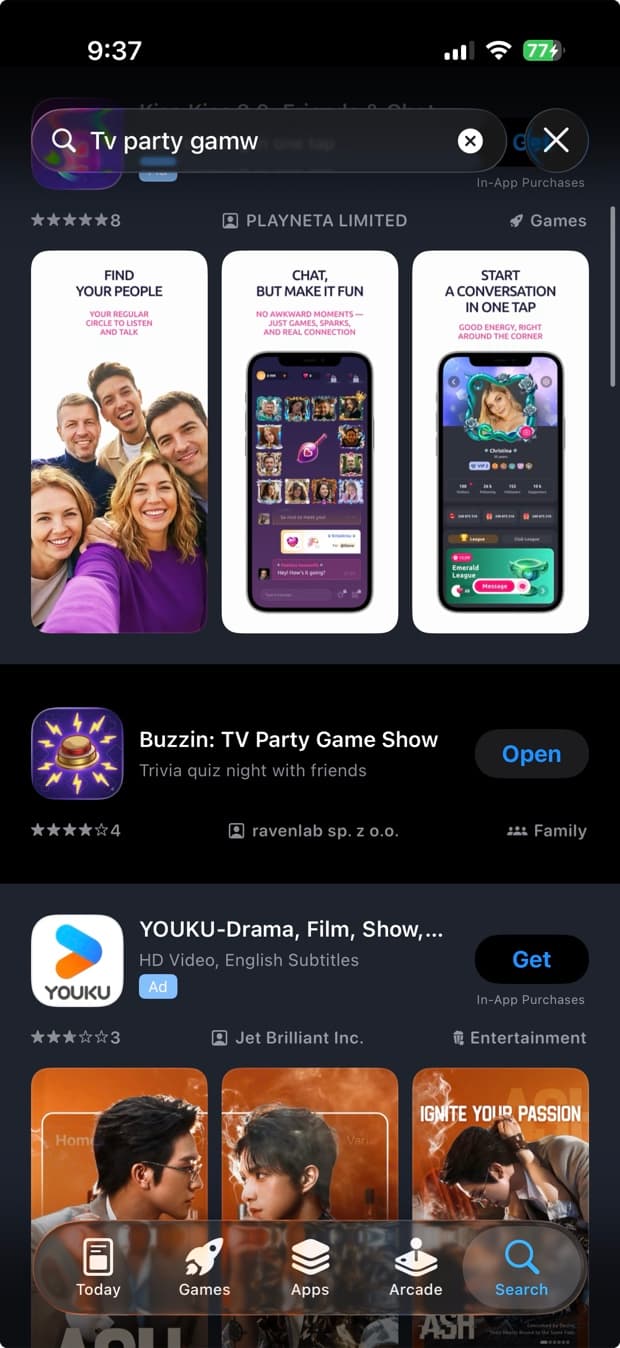
In search results it takes the full width of the row and the screenshots are not shown beside it. In the wild it gets worse: the row renders with no creative at all. Below, the same app sits between two competitors showing three frames each, and shows nothing but an icon and a line of text.
- Portrait app, portrait preview. It sits alongside your first screenshots instead of replacing them, so you keep both surfaces.
- Genuinely landscape product (a TV game, a racing game, a video editor): either letterbox the footage into a portrait frame so the row keeps the gallery, or accept a bare row and let the icon, title and subtitle carry it.
- Never mix orientationsin one device's set. A portrait UI in a landscape frame is a documented App Review rejection reason, and the exact sizes each store expects are worth checking before you re-export.
- Verify on a clean device after every release. The layout differs for people who already have the app, so your own phone tells you very little.
The same app on the other store, for comparison: Buzzin on the App Store.
The craft rules that decide the outcome
- Your poster frame is a screenshot. Autoplay is conditional, so when it does not fire the whole video collapses to that one still. Caption it, make it legible at thumbnail size, and never ship a black screen with a wordmark.
- The first three seconds work on mute. Show the product in second one, carry the message in on-screen text, front-load the best moment.
- 15 to 20 seconds even though Apple allows 30. Shorter loops get seen more than once.
- Localize it. Video is per localization in both stores; burned-in English text on a German listing is the same mistake as an untranslated caption.
- Keep it current. A preview showing a UI from two redesigns ago is worse than no video.
Before you spend the budget
- If your first two frames are raw captures with no captions, fix those first. That is a bigger and cheaper win, and ordering and captioning them costs an afternoon.
- If a still frame communicates the same thing, the video adds load time and risk without adding information.
- If budget is tight, iOS first: there video buys a discovery surface, on Play it only pays off after the tap.
Then test it rather than trusting the averages above. Product Page Optimization on the App Store and store listing experiments on Google Play are free. Run video against no video, and poster frames against each other separately, because those are two different experiments. Give each two weeks, change one variable, and record what the listing looked like when the numbers moved. That last part is what quietly breaks, and keeping a per-language, per-store record of what shipped and when is a large part of what we built AppBoard to do.
Do the cheap check first, though. Search for your own app on a phone that has never installed it and look at what the row renders. If it comes back as a line of text between two competitors showing three frames each, no amount of production value fixes that.
Frequently asked questions
Does an app preview video increase installs?
A/B testing vendors report install conversion lifts of about 16 percent (SplitMetrics) up to 20 to 35 percent (StoreMaven). That is vendor data rather than peer-reviewed research, so treat it as directional. The effect depends heavily on category: games gain the most, while several finance and productivity tests show conversion dropping by 3 to 7 percent, because a video is a slower way to say what one captioned frame says instantly.
How many videos can you add on the App Store and Google Play?
The App Store allows up to 3 app previews per localization, 15 to 30 seconds each, uploaded as a file (M4V, MP4 or MOV, up to 500 MB). Google Play takes one promo video per store listing, and only as the URL of a single YouTube video, not a playlist and not a channel.
Why does my app show no screenshots in App Store search results?
The usual cause is a landscape app preview combined with portrait screenshots. A landscape preview takes the full width of the search result row and the screenshots are not shown beside it, and in practice the row can render with no creative at all. Check it on a device that has never installed your app, because the product page layout differs for people who already have it.
Does the Google Play promo video show in search results?
No. A Google Play promo video does not appear in Play search results at all. It only works on the product page, where it may autoplay inline muted for up to 30 seconds. That is the opposite of the App Store, where an app preview plays in search results before anyone has chosen you.
Can you add a separate video for each language?
Yes, in both stores. App Store previews are per localization. On Google Play the store listing graphics, video included, are localized per language. Play also has a separate and rarely used surface: under Grow users, Store presence, YouTube Videos you attach channels or playlists with a language set on each, one language per channel.
Store rules verified against Apple and Google documentation in August 2026. Conversion figures come from A/B testing vendors (SplitMetrics, StoreMaven, AppFollow) and are directional, not peer-reviewed.
Try this workflow in AppBoard
See how AppBoard handles listings, versioning, keywords, and reviews for both stores - no signup required.
Open the live demo